MECO
Developed as a research and prototyping project for the Human-Computer Interaction course within the MSc Game Development and Learning Technology program at SDU.
Tech Stack
About the Project
MECO is a digital interactive photo album tailored for elderly individuals and patients living with mild-to-moderate dementia. Recognizing that standard modern interfaces often trigger technical confusion and frustration, this project focused on designing an accessible, custom interface. The platform helps users unlock and preserve personal history, turning passive media consumption into active cognitive exercise.

Cognitive Mechanics
The application uses a psychological strategy called 'elaborative rehearsal' to strengthen retention. By enabling multi-sensory triggers such as interactive image tagging, descriptive metadata, and text-to-speech functionality, the interface helps users make deeper mental connections. These design elements actively assist patients who have trouble independently generating vivid mental imagery.
Targeted UX Design
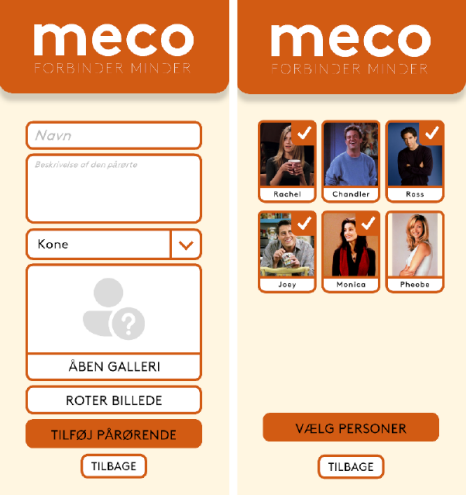
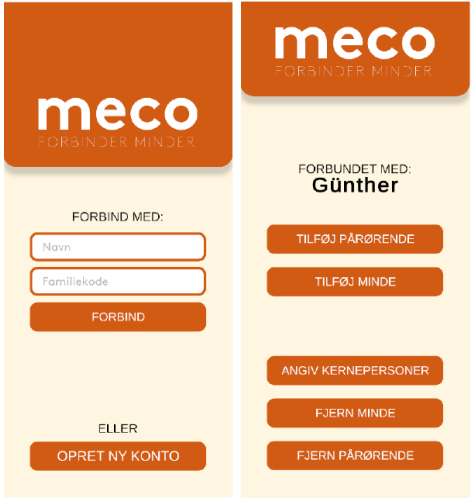
Standard layouts were entirely reworked to meet strict cognitive accessibility standards. The layout avoids complex multi-layered menus, tiny touch-targets, and abstract icons. Instead, it relies on prominent touch zones, distinct color-coding, and clear visual signifiers that lower cognitive load and accommodate motor impairments common in older age groups.
Interface Architecture
Every interactive element follows foundational design rules inspired by Don Norman’s principles of affordance and feedback. Buttons look unmistakably clickable, and each user selection yields immediate, clear system changes. This architecture preserves the user's sense of autonomy and control, minimizing anxiety during system navigation.
Iterative Prototyping & Testing
The high-fidelity prototype was built through an iterative loop using low-fidelity paper sketches, digital wireframes, and interactive click-dummies. Usability benchmarks were evaluated using structured qualitative walkthroughs, adjusting the layout dynamically to resolve friction points uncovered during participant testing.